VELUX Support - VELUX ACTIVE with NETATMO
Where can I find the MAC address and/or serial number of my gateway?
If your gateway is already installed, you can find the MAC address in the app.
Go to: Settings > Home management > Gateway > MAC address and look for the 12-character code: ""70: ee :50: xx: xx: xx"".
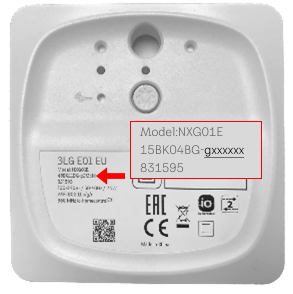
If you have not installed your gateway, you can find the MAC address printed on the back of the gateway.
Look for the 7-character code in the format ""g: xx: xx: xx"" (the last part of the gateway serial number in the 3rd line)."
How can we help you?
Need further assistance?
If you are not sure how to proceed or you can’t find what you are looking for, get the help you need.